Good Websites
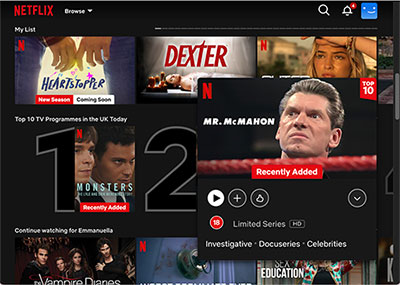
User-Friendly Interface: the layout of the website makes it easy for users to browse and find content. Categories, personalized recommendations, and a search function streamline the viewing experience.
Extensive Library: Netflix offers many movies, TV shows, documentaries, and original programming. This variety ensures something for everyone, catering to diverse tastes and interests.
Personalisation: the recommendation algorithm analyses user viewing habits to suggest content tailored to individual preferences, improving user engagement and satisfaction.
Multiple Viewing Options: users can watch on various devices—smart TVs, tablets, smartphones, and computers—allowing for flexible viewing experiences wherever they are.
Accessibility Features: Netflix includes subtitles, audio descriptions, and customisable playback speeds, making its content more accessible to a broader audience.
-
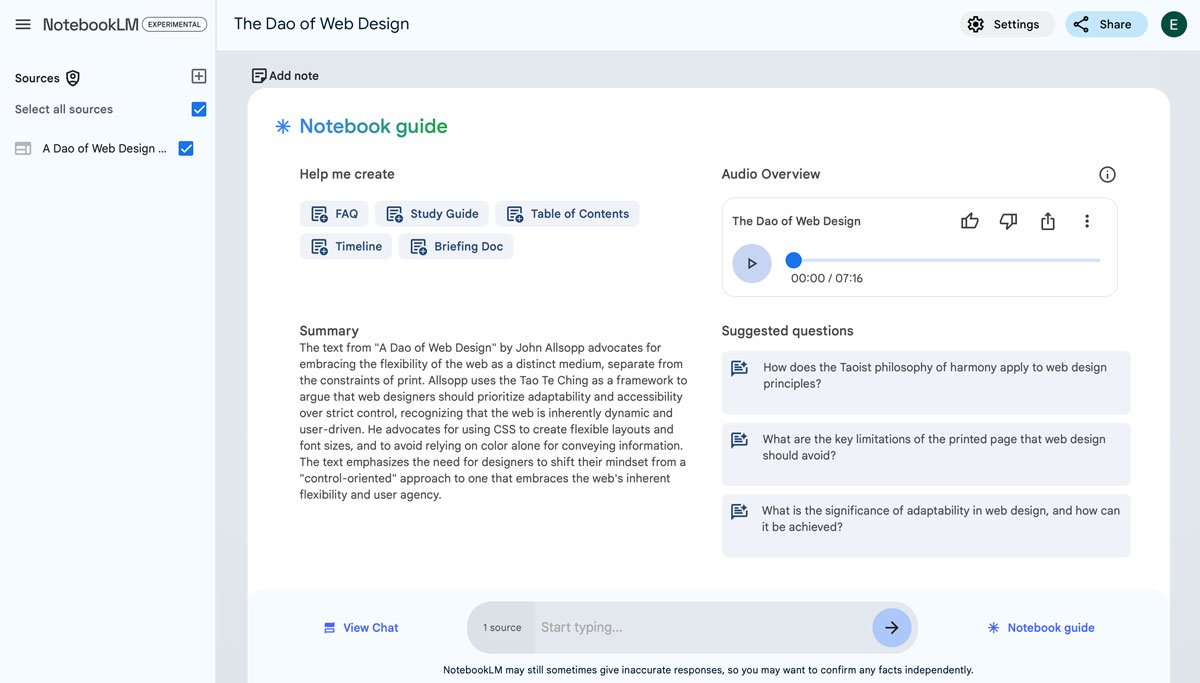
Simplicity: the website features a clean, user-friendly interface that makes it easy for users to navigate and create notes without unnecessary distractions.
Organisation: it allows users to categorise and tag their notes, helping to keep information organised and easily retrievable.
Accessibility: Notebook LM is a web-based tool that can be accessed from any device with an internet connection, making it convenient for users to take and edit notes on the go.
Collaboration Features: the platform often supports collaborative note-taking, allowing multiple users to work on notes simultaneously, which is great for group projects or shared learning.
Search Functionality: the ability to search through notes quickly helps users find specific information without scrolling through lengthy documents.
Integration: it often integrates well with other tools and applications, allowing users to streamline their workflow and enhance productivity.
Customisability: users can often personalize their experience, from changing themes to adjusting settings, making the platform feel more tailored to individual preferences.
Cross-Platform Syncing: syncing notes across devices ensures users can access their information anytime, anywhere.
Free to Use: Notebook LM is free, making it accessible to many users, including students and professionals.
-
Simplicity: the website features a clean, user-friendly interface that makes it easy for users to navigate and create notes without unnecessary distractions.
Organisation: it allows users to categorise and tag their notes, helping to keep information organised and easily retrievable.
Accessibility: Notebook LM is a web-based tool that can be accessed from any device with an internet connection, making it convenient for users to take and edit notes on the go.
Collaboration Features: the platform often supports collaborative note-taking, allowing multiple users to work on notes simultaneously, which is great for group projects or shared learning.
Search Functionality: the ability to search through notes quickly helps users find specific information without scrolling through lengthy documents.
Integration: it often integrates well with other tools and applications, allowing users to streamline their workflow and enhance productivity.
Customisability: users can often personalize their experience, from changing themes to adjusting settings, making the platform feel more tailored to individual preferences.
Cross-Platform Syncing: syncing notes across devices ensures users can access their information anytime, anywhere.
Free to Use: Notebook LM is free, making it accessible to many users, including students and professionals.
-
Simplicity: the website features a clean, user-friendly interface that makes it easy for users to navigate and create notes without unnecessary distractions.
Organisation: it allows users to categorise and tag their notes, helping to keep information organised and easily retrievable.
Accessibility: Notebook LM is a web-based tool that can be accessed from any device with an internet connection, making it convenient for users to take and edit notes on the go.
Collaboration Features: the platform often supports collaborative note-taking, allowing multiple users to work on notes simultaneously, which is great for group projects or shared learning.
Search Functionality: the ability to search through notes quickly helps users find specific information without scrolling through lengthy documents.
Integration: it often integrates well with other tools and applications, allowing users to streamline their workflow and enhance productivity.
Customisability: users can often personalize their experience, from changing themes to adjusting settings, making the platform feel more tailored to individual preferences.
Cross-Platform Syncing: syncing notes across devices ensures users can access their information anytime, anywhere.
Free to Use: Notebook LM is free, making it accessible to many users, including students and professionals.
-
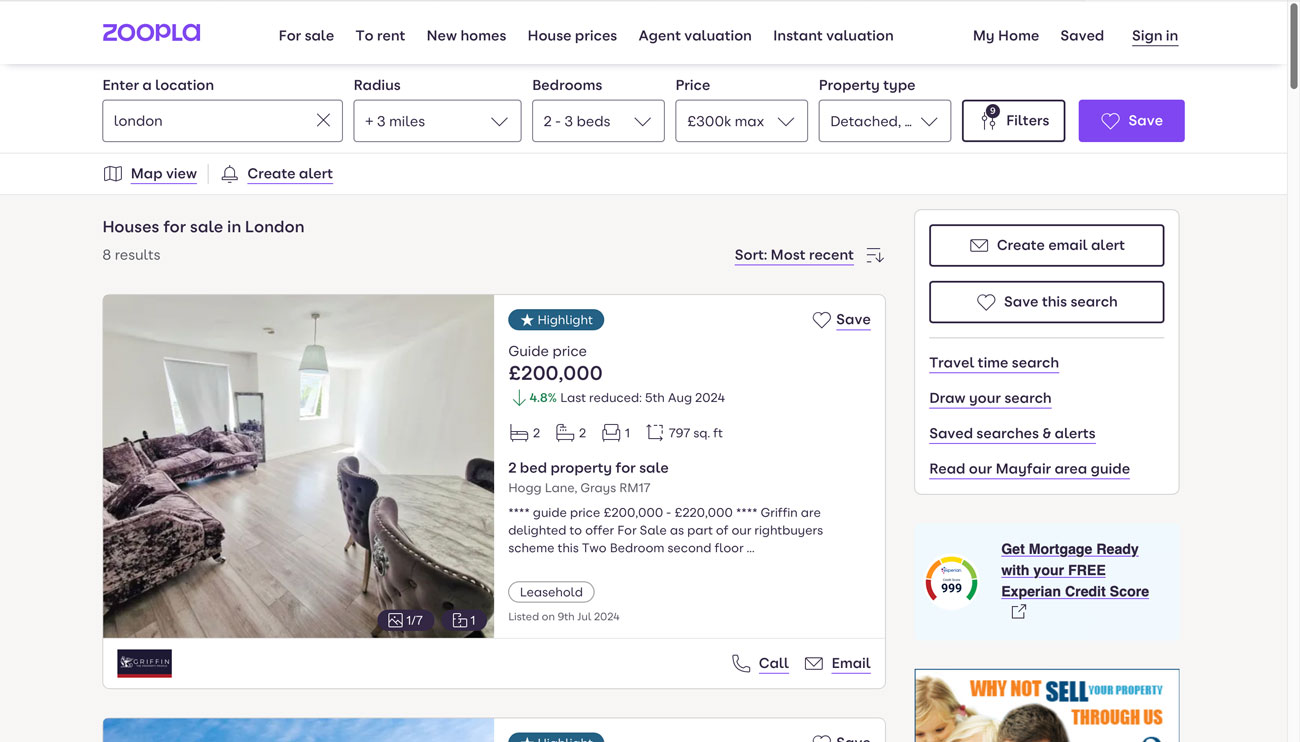
Comprehensive Listings: offers a wide range of property listings, including homes for sale, rentals, and commercial properties, providing users with extensive options to choose from.
User-Friendly Interface: the design allows users to easily search, and filter properties based on location, price, size, and other criteria, enhancing the overall user experience.
Detailed Property Information: each listing includes detailed descriptions, high-quality photos, floor plans, and virtual tours, helping users make informed decisions.
Market Insights: provides valuable data, such as property values, price trends, and neighbourhood statistics, empowering users with the information needed to navigate the housing market effectively.
Personalised Alerts: users can set up alerts for specific property types or areas, ensuring they are notified when new listings match their preferences.
Tools: includes tools like mortgage calculators, helping potential buyers understand their financial options and plan their budgets.
Local Area Information: offers insights into local amenities, schools, transport links, and community features, assisting users in assessing the suitability of neighbourhoods.
Mobile Accessibility: has an app which provides a seamless experience for users on the go, allowing them to search for properties and manage alerts from their mobile devices.
Community: includes forums and community discussions, allowing users to ask questions and share experiences, which can be helpful for first-time buyers and renters.
-
Comprehensive Listings: offers a wide range of property listings, including homes for sale, rentals, and commercial properties, providing users with extensive options to choose from.
User-Friendly Interface: the design allows users to easily search, and filter properties based on location, price, size, and other criteria, enhancing the overall user experience.
Detailed Property Information: each listing includes detailed descriptions, high-quality photos, floor plans, and virtual tours, helping users make informed decisions.
Market Insights: provides valuable data, such as property values, price trends, and neighbourhood statistics, empowering users with the information needed to navigate the housing market effectively.
Personalised Alerts: users can set up alerts for specific property types or areas, ensuring they are notified when new listings match their preferences.
Tools: includes tools like mortgage calculators, helping potential buyers understand their financial options and plan their budgets.
Local Area Information: offers insights into local amenities, schools, transport links, and community features, assisting users in assessing the suitability of neighbourhoods.
Mobile Accessibility: has an app which provides a seamless experience for users on the go, allowing them to search for properties and manage alerts from their mobile devices.
Community: includes forums and community discussions, allowing users to ask questions and share experiences, which can be helpful for first-time buyers and renters.
-
Comprehensive Listings: offers a wide range of property listings, including homes for sale, rentals, and commercial properties, providing users with extensive options to choose from.
User-Friendly Interface: the design allows users to easily search, and filter properties based on location, price, size, and other criteria, enhancing the overall user experience.
Detailed Property Information: each listing includes detailed descriptions, high-quality photos, floor plans, and virtual tours, helping users make informed decisions.
Market Insights: provides valuable data, such as property values, price trends, and neighbourhood statistics, empowering users with the information needed to navigate the housing market effectively.
Personalised Alerts: users can set up alerts for specific property types or areas, ensuring they are notified when new listings match their preferences.
Tools: includes tools like mortgage calculators, helping potential buyers understand their financial options and plan their budgets.
Local Area Information: offers insights into local amenities, schools, transport links, and community features, assisting users in assessing the suitability of neighbourhoods.
Mobile Accessibility: has an app which provides a seamless experience for users on the go, allowing them to search for properties and manage alerts from their mobile devices.
Community: includes forums and community discussions, allowing users to ask questions and share experiences, which can be helpful for first-time buyers and renters.